
When I have some tips or tricks to share with my fellow editors (or aspiring editorial professionals!), I’ll share them here.
- LINK: Editor Connection Program (Atlanta Writers Club Self-Publishing Conference)
- VIDEO: “Banking on Affordability” (EFA Georgia Meeting – July 2026)
- LINKS: Editor Tech Showcase (EFA Georgia Meeting – May 2026)
- LINKS: Sourcing Clients (EFA Georgia Meeting – January 2026)
- Business Automation for Editorial Professionals (ACES VCON 2025)
- VIDEO: “Results-Driven Networking for Freelance Editors”
- LINKS: Indexing Tools and Courses
- GRAPHIC: Book Development Clock
- VIDEO: “How Authoring Improves Editing” by Katherine Pickett of POP Editorial
- VIDEO: “An Option for Managing Payment Plans (Pay-As-You-Go)”
Editor Connection Program
NOTE: This year’s ECP is currently sold out! But you can get on our notification list for next year using the button below. We’ll send you an email as soon as registration opens up (usually in late summer or early fall).
The Editor Connection Program is part of the Atlanta Writers Club Atlanta Self-Publishing Conference which takes place in March / April of each year.
Between now and then, as registrants sign up for the conference, we will allow them to upload the first 10 pages of their manuscript for a sample edit. If you sign up to be an editor overseeing one of our genres (fantasy, self-help, historical fiction, mystery, etc.), whenever someone uploads a sample that fits that genre, you will be provided with their name, email address, and sample.
You then apply your skills to their sample and email it to them along with an introduction.
The goals of the ECP are:
- To expose writers to the various benefits of partnering with an editor to enhance their work.
- To connect editors with potential clients to help broaden their audience and increase their revenue.
You’ll be provided with access to a Google Sheet of submissions in your selected genre(s). We recommend checking that sheet once per week for new registrants in your genre requesting a sample edit.
That’s it!
Sign up, complete sample edits, and send those samples to our registrants (your prospective clients).
‘No’ Business is Good Business
- Saying ‘no’ can be extremely difficult for some people, even though it can help protect your health and livelihood.
- A boundary is simply a notification of how you are going to respond to someone’s behavior. Some people think having boundaries is a way to control what other people do, but that’s not the case. For instance, laws are boundaries (if you’re caught breaking X law, you could be fined or arrested), but people commit crimes all the time. The boundary existing doesn’t prevent someone from crossing the boundary, it just lets them know what your going to do if they make that choice.
- If you remember to do all your chores this week, I’ll take you shopping at the bookstore on Saturday. / If you don’t remember to do all your chores this week, I won’t take you shopping at the bookstore on Saturday.
- If you have a sexual relationship with someone who isn’t me, I will divorce you.
- If you email me after my business hours have ended for the week, I will reply to your email on the following business day.
- Set boundaries early (a pre-emptive “no”) by planning for whatever your worst-case scenarios are.
- One of mine was doing work and not getting paid for it, so I set the policy (a.k.a. “boundary”) that all work is paid in advance.
- You have likely heard horror stories from other professionals (if you haven’t, please ask us, because we have PLENTY) about things that happened to them and pushed them to add a new policy to their terms.
- Even if you think something has a low likelihood of ever happening, having your policy regarding that issue in place doesn’t heart. The worst that could happen is that you never need the provision. In general, I err on the side of having something in place and never needing it instead of needing something in place and not having it.
- Try to avoid externalizing language during verbal or written exchanges.
- Sharks will just try to manipulate you, making the exchange last longer and create more discomfort for you.
- Externalizing language tries to make something or someone other than yourself responsible for the “no” instead of you openly owning it.
- Phrases like, “Sorry, I can’t,” “I shouldn’t,” “I wish I could,” are all examples of externalizing language.
- This is because you 100% can take on work for free, watch your brother’s untrained puppy for a weekend, or chew glass. But your physical ability to do something is rarely going to be when you have trouble rejecting an offer, so “I can’t” isn’t relevant.
- “I can’t” can send the message that you want to, but there’s something standing in the way, or someone else isn’t allowing you to do it. This means a shark is going to try to figure out what they obstacle is and get rid of it so they can get what they want out of you.
- “I shouldn’t” is a judgement (should, shouldn’t, good, bad, right, wrong, etc.) that has nothing to do with refusing the ask.
- “I wish I could, but” is similar to “I can’t” because it frames that refusal as something that is outside of your control and not your own mature, logical decision.
- People often use EXTERNALIZING LANGUAGE when they feel guilty or otherwise uncomfortable about saying ‘no’ to someone. Even if that person’s request is insulting or abusive. In many people’s upbringing, the idea of refusing a request from someone was framed as rude or disrespectful.
- Saying ‘no’ is a healthy part of any relationship, whether it be romantic, familial, professional, or platonic.
- Making excuses is another trap that ties into externalizing the ‘no’ instead of confidently taking responsibility for it.
- Generally speaking, if you think you need to make excuses for doing something, it’s because you believe you don’t deserve to do it or that it is somehow a negative thing. You make excuses when you’re late to an appointment or break something or lash out at people. But when you’re simply clarifying where your boundaries are by saying ‘no’ to somebody, you don’t need to make excuses for that.
- You’ve heard it a million times, I’m sure, but “‘No’ is a complete sentence,” is a guiding principle when it comes to boundaries. No one is owed an explanation for why you declined an offer. After all, it was an offer, not a command (and even if it was, does this person actually have the authority to order you around?).
- The same principle applies to explaining yourself. You don’t have to do this just to reject someone’s proposal or request.
- One exception to this can be when you are in a teaching position. If you are training a new-hire, parenting children, or interacting with a new romantic partner, for example. These are situations in which explaining why you’re saying ‘no’ can help people better understand how to effectively work with you, how to better manage their own behavior, or how to love you in a respectful way because they understand the motivations behind the know.
- Another caveat is that, as a business owner, you may want to redirect clients you’re saying ‘no’ to so that they follow the path your prefer. So, if they ask you to do work you haven’t been paid to do, answering with “No.” could be a missing opportunity. Instead, responding with “I’d be happy to get to work on that once you purchase that service. Here’s the link: [insert link to that service or add-ons purchase page].
- But, still, this would be you deciding to invest in the relationship by giving them this information, you still don’t “owe” it to them, per se.
- A ‘no’ can be presented non-verbally, as well.
- An example would be not answering your phone outside of your designated work hours or not doing work on a piece that is outside of the scope of what someone purchased (i.e., if someone ordered a manuscript evaluation, you don’t make any grammatical corrections to the piece since they did not pay you for copyediting).
- Verbally and in writing:
- “No.” Simple, to-the-point, no risk of meandering off into excuses or explanations.
“No, thank you.” May be helpful in more formal situations.
“My answer is ‘no.’” Can be used if you start off with externalizing language and things get muddled. Feel free to interrupt yourself (break off a long, drawn out excuse, for example) and say this to “reset” the conversation.- “I don’t do that, but I can refer you to someone who does.” Simple redirect when someone asks for a service you prefer not to do or don’t specialize in (rewriting AI-generated content, sensitivity reading outside of your race, etc.).
- “When you’re ready with your payment for X, I’ll be glad to start that service.” A redirect for when a client wants you do add on a service for free.
- There can be unpleasant consequences to saying ‘no’ to clients. This doesn’t mean you should avoid saying ‘no’ when you need to, but it can help to be aware of these and mentally prepare yourself for the possibilities.
- Feeling guilty. As noted earlier, there is often inherently a feeling of guilt that come swith refusing a request. Don’t let this emotion bully you, though! You deserve to say ‘no’ to manage your wellbeing, productivity, and ethics.
- Getting backlash. Even though you may be working with adults, there are people who are rarely, if ever, told ‘no.’ So having you do it can cause them to react defensively. Sometimes this is a flareup of frustration and then they simmer down and come around to apologize and continue working with you (I’ve had this happen more than once, especially with some of my clients who are fellow neurodelightfuls). Other times, the impact is more extreme and can lead to them doing everything from making false accusations against you, leaving lie-laden reviews or testimonials, and refusing to refer people to you. This is ultra-rare, in my experience, but it’s not impossible by any means.
- Losing clients. At the most extreme end, a client can decide that they no longer want to work with you because of your refusal. This may not be a true “loss,” though. Consider whether or not you really want to work long-term with someone who struggles that much with someone setting boundaries? In this way, business relationships aren’t all that different from romantic relationships. Telling someone you won’t do something they want and seeing their reaction to that is a great way to gauge if your partner is a healthy one or not so you can decide how, or if, you want to continue the relationship.
- On the flip side, there are benefits to setting boundaries.
- Lower stress from not doing projects you don’t want to and not engaging in “slave labor” by doing work you haven’t been paid to do.
- More confidence in setting those boundaries and sticking with them as you do it more often.
- Having to say ‘no’ less often because people believe you the first time. They have faith in the consistency that you’ve shown with them and other clients, so they don’t “test” you.
- You look like a safe, reliable professional because you aren’t constantly changing your work scope, turnaround times, prices, deliverables, or other aspects of your business. People know what they are going to get from you when they hire you and that this will stay relatively steady.
- Practicing saying ‘no’ professionally can bleed over into your personal life as well. This can help you create healthy boundaries in relationships with everyone from dating partners to parents.
Banking on Affordability
This session covered ways that you can increase your project win rate, revenue, and customer base without lowering your compensation rates (sales, discount codes, etc.).
Editor Tech Showcase
The Georgia Chapter Editor Tech Showcase is all about collaborating to come up with technological options that make our work more efficient. Here’s a summary of what we covered during the meeting in case you missed it. Two things to note:
- I operate my business mainly in the Google and Adobe ecosystems, so the additional options noted are there for your convenience and exploration, but I wouldn’t be able to vouch for them since I have little/ no direct experience using them.
- Since these services are so integral to the success of my business, I am using paid versions of them, which may have more features than free versions.
QUESTIONS
These were asked during the session and (in true Tenesha fashion!) I didn’t have the answers then. So, here they are now for all to see!
Is VLC still available for video editing?
I remember using VLC as a media player ages ago, but never as a video editor. So far, I’ve not found any evidence that VLC offers video editing as an option. But if you do, please let me know so I can update this text!
Can you / what’s the process for transferring Canva projects to Adobe Express?
I’ve discovered that this is not only possible, but fairly simple! In a nutshell, you download your Canva designs as PDFs and then upload them in your Adobe Express account and you’re done!
Here’s a video I found that outlines the steps.
NOTES
There were a couple of strong points that were brought up during the discussion that I want to highlight here.
Affinity by Canva
Jamie Watson introduced me / us to Affinity by Canva. Affinity is a design suite that can be accessed for free and used in a manner similar to some of the programs Adobe offers, such as InDesign and Photoshop. All you need is a Canva account in order to use Affinity. This may be a solid alternative if you are looking for free creative software. You can unlock AI features (generative fill, generative expand, etc.), if you have a paid Canva account.
Security and Privacy Limitations with Free Options
Dayna Reidenouer brought up the awesome point that sometimes free software is free, in part, because there are more privacy limitations (e.g., selling data in order to offset not charging users for something) and (I’m adding) security vulnerabilities than paid programs and services.
For example, the security of a free Google account (TeneshaWritesOddBooks@Gmail.com) would not be HIPAA compliant, while a paid Google Workspace account (Tenesha@TeneshaLCurtis.com) would be. Same company, same service, but a different tier that offers greater security and privacy.
When deciding which software or services to use for your business, carefully consider what you are giving up in order to avoid paying money for something.
TECH and TOOLS
If you’re looking for a specific type of product or service, use CTRL+F to search this page. When the dialogue box opens, just type in what you’re looking for (“mice, CRM, monitor, keyboard, email management, etc.).
Google Docs
For creating Word-like documents in a cloud-based system you can access from any internet-connected device.
Additional Options: Dropbox, Notion
Google Forms
For creating forms of just about any kind. I use them to help contest judges review submissions and submit their ratings, to sign people up for my alpha and beta reader teams, and even to get potential clients to give me the rundown about their project needs without taking the time for a phone call or in-person meeting.
One of the biggest advantages I’ve found with Google Forms is that I never receive spam replies as I have through forms on other platforms, such as WordPress.
Additional Options: RegFox, Airtable, SurveyMonkey.
Adobe Express
For creating a wide range of things (resumes, web pages, PDFs, magazines, TikTok videos, book covers, Instagram posts, movie posters, restaurant menus, slide decks, etc.) in a quick, simple, drag-and-drop interface that integrates with industry-standard programs like Photoshop, Illustrator, and Premiere Pro. A free version is available and the paid version is $10 per month if you don’t work within the Adobe ecosystem for your business.
If you have an Adobe Suite subscription, the premium version is automatically included at no additional cost. As of this writing, I’m currently paying $42 per month for access to all of the Adobe apps, but you can also pay for access to them à la carte. Generally, I’ve found that if you need more than one, you’ll likely save money just paying for the entire suite. This won’t always be the case, but be sure to check the math before you decide on paying for 2 or 3 apps instead of all of them.
Additional Options: Piktochart, Pixlr, Canva, CapCut
Bluehost
I left GoDaddy for Bluehost almost a decade ago. I can create and manage up to 20 different websites (of which, I’m currently using 17) for $21.99 per month. This is great for someone like me who is running a firm that offers multiple things to authors (editorial services, authorship training, genre-specific book rec lists, writing contests, etc.), so I’m hoping you’ll be able to find a plan that works for you as well.
You can check the company out at Bluehost.com.
As I’ve been working with some of my authors on their websites, I’ve noticed that some services will charge you for features that come standard with all of my WordPress sites through Bluehost. So, even if you have a “free” site, the e-commerce option you might use to easily manage orders and allow people to pay on their invoice might cost you $30 per month for that single site. When you see a “free” option, just double-check to make sure that everything that you will need to run your business efficiently is free, not just a static web page (unless that’s all you’re looking for, of course!).
Additional Options: Hostinger, Flywheel, Squarespace
Mailerlite
I left Mailchimp for Mailerlite dozens of moons ago. As both an editor and an author, it has made the automation of various processes a lot easier. For instance, I’m able to automatically let new subscribers to my romance imprint email list select between two free romance books so that everyone who signs up can be rewarded, but choose an option that suits them better (meaning they’re more likely to read it and actually review it favorably because they opted for what they wanted, not just what I felt like giving to them). I’m planning a similar setup for the WeCanPub email list so that subscribers will be able to choose from multiple books depending on where they are in the book development process (Intro to Indie Publishing, How to Outline a Book: Fiction, Self-Revision Fundamentals, etc.). With their recent update allowing you to sell digital products through your emails, even nudging people to buy books can be done more directly. Besides books, you could offer things like pre-made worksheets for particular tasks, resource lists, or in-depth PDFs that include graphics and screenshots for walking clients through specific processes. As someone who manages 7 lists for my own company and 5 lists on behalf of others, I’ve found that having all of those lists housed in Mailerlite offers the best value for the money, including the free version. Give them a try at Mailerlite.com.
Additional Options: Constant Contact, Kit, AWeber
Google Workspace
Formerly known as “G Suite,” Google Workspace is essentially the paid version of Gmail. It allows me to seamlessly use my domain names for email addresses (love@astanna.com, tenesha@teneshalcurtis.com, help@getbookhelp.com, etc.) without having to leave the Google ecosystem and offers enhanced versions of everything I would get with a free Google account. For example, a free Gmail account comes with a storage capacity of 15 GB. Meanwhile, my Google Workspace account affords 6 TB of space. That’s 400 times more space, allowing me to even help some of my nonprofits with their storage woes and makes sure that there’s literally no illustration, photograph, video, or book file that I can’t be hired to work on simply because I would literally have nowhere to store it and no way to open it. Being able to access all the same apps and integrations as a Gmail account is ultra-convenient as well (Analytics, Tasks, Sites, Keep, etc.). As a neurodelightful person, not having to remember a bunch of different passwords for the various sites that allow me to log on with my Google account is a big saver of time and stress. Using Google My Business and connecting it to my company website has also helped tremendously with SEO and people being able to find GetBookHelp.com organically through manual or AI searches without my having to pay for ads. See if upgrading / switching to Google Workspace would be a good fit for you: Google Workspace
Additional Options: Zoho Workplace, Lark, Microsoft 365
Shopify
A decent customer relationship management (CRM) system can make a world of difference when you’re juggling multiple projects each month and managing dozens of clients throughout each year. Instead of having a separate CRM, I do this through Shopify, leveraging their social media selling integration, POD merch integration (shirts, tote bags, pen bags, wall art, etc.), and organic SEO to boost sales and visibility for GetBookHelp.com. CRMs generally provide you with a dashboard where you can see at a glance things like what services are selling the most, where customers are coming from, who has outstanding invoices, and so on. You can also manage processes like sending promotional emails / text messages, requesting service reviews (having this happen automatically without me having to remember to do it has been excellent!), and paying subcontractors. For Shopify in specific, I also love that I’m able to format customer invoices so that all my accepted payment processors (PayPal, Chime, Stripe, Klarna, Apple Pay, CashApp, Amazon Pay, Venmo, Zelle, etc.) are easily accessible as soon as the client is ready to pay. Review Shopify’s features or take a look at some alternatives below.
Additional Options: Moxie, Dubsado, Indy
ARE PAID SERVICES WORTH IT?
Generally speaking, yes! But the answer to this question will vary from pro to pro depending on the product in question as well as the pro’s needs and resources. For instance, I offer illustrations and do quite a bit of video editing in my work, so having access to Adobe Illustrator and Adobe Premiere Pro (in addition to Adobe Express) saves me dozens of hours of work each month, making the $42 price tag an easy sell for me. For an editor who only provides a single service, such as copyediting, spending any money on any of these programs wouldn’t necessarily be worth it, even if the extra help would be nice to have.
If you like the results you get with a service enough to even consider buying it, it’s worth it to at least do the math. Consider how much time the product saves you, how much easier it is to sell your services and win jobs because you are knowledgeable about using a particular platform, and the added quality and accessibility of your deliverables. Then compare that number to the cost of the product / service. If what you save / gain by getting it is more than what you pay, it’s likely a solid buy for you. In my example above, the cheapest service I offer is $50 per hour. So, if I’m saving at least 10 hours of work each month, that’s $500 per month Adobe is saving me at a minimum. That means I’m paying $42 to save $500 or more in time, and that doesn’t even factor in clients I work with who may not have hired me at all if I weren’t knowledgeable about working in programs like Photoshop or InDesign.
Keep in mind that you will be able to write off whatever you’re paying on your taxes, and you can bake the cost into your pricing so that each project you win covers all / some of the expense of the product or service each month / year.
Example: You average 50 projects per year. The equipment / software you’ve purchased costs $1,000. To be safe, round your annual project average down. In this case, let’s pretend you only get 40 projects per year. $1,000 / 40 projects means each project needs to compensate you at least $25 to cover the expense. If you take $25 off of each of your projects and are still able to pay your bills, you can already (at least theoretically) afford the purchase. If not, you can also do a rate increase to get to the level of compensation you’ll need to cover the expense. You also have the option of putting that $25 from each project aside into a high-yield account so that you’ll have the $1,000 (and then some) in hand before you make your purchase, if that feels more comfortable and you don’t mind going another year without the equipment / software you want.
One of the reasons that I’ve seen people put off purchasing a particular program, subscription, or even piece of equipment is because it costs money. At all.
While I can certainly understand not wanting to spend any more than you must in order to keep your profit margins in a good place, you could be doing harm to your business, yourself, and your clients by refusing to pay for things that will increase the quality of your services, help you reach more customers, and make doing your work faster and easier. Do what you can to make sure that deciding to skip buying something isn’t going to hurt you in the long run.
Sourcing Clients
Here are the various resources we discussed during the meeting related to being able to find paying clients.
CLIENTS AND PARTNERS
Direct referrals from past clients and editorial partners are where around 80% of my new clients come from. Building solid relationships by doing strong work and being fair to the firms and partners that you work with can go a long way. It may take you some time to build up enough of a freelancing work history for this to be a consistent way to source clients, but it’s something to keep in mind and work towards as you build your business. Often, these relationships start with being part of organizations like the EFA and regularly participating in meetings, events, and forums like the EFA Discord Server.
- Offer clients and partners referral fees for sending you paying customers. Example: a new client buys $8,000 in ghostwriting services so you give the person who referred them $400.
- When a partner refers a client to you, in addition to the referral fee, make sure they get first dibs on serving the client when the project gets to their specialty. Example: a copy editor sends someone to me for developmental editing first, the copy editor gets a cut of whatever the client spends with me and then I kick the project back to the copy editor for copyediting services instead of sharing it with all the copyeditors on my team. Only if the referring copy editor rejects the project for some reason do I offer it to my other copy editing partners.
- This is a source that is relatively easy to sustain because it essentially feeds itself!
EVENTS
Virtual and in-person events such as conferences, workshops, and fairs can be great places to show off your skills and let people know more about you and what you do for a living. I steer clear of paying for these events as much as I can in order to virtually guarantee profitability. This happens because I’ve been hired to speak at an event ( meaning I get a check for teaching / being on a panel in addition to money from whatever I sell at my table, in addition to the value of a ticket to the event since I get in for free), have been scheduled as a volunteer speaker, or have volunteered to manage some aspect of the event (process registrations, run one of the conference social media profiles, etc. For new freelancers on a budget, you can offer to do the same so that you can get a table for your business at the event for free. Not everyone will take you up on the offer, but it doesn’t hurt to ask.
One key tactic I use is to offer anyone who pays for a book coaching session during the event and schedules it within the next week double their call length. So if they purchase a $25 book coaching session as a 30-minute phone call, they’ll get an hour instead. This ensures that they don’t set the appointment so far out that they forget about it. It also means I leave the event with multiple appointments set up and paid for. And the majority of those calls end up turning into those people buying services and becoming repeat customers. Giving them an extra 30 minutes on the phone is MORE THAN worth that!
Some conferences and workshops are looking for editors to help provide sample edits to their attendees. These forms of participation can get you in direct contact with people who are actively seeking the assistance of professionals, but let you go beyond simply letting them know you exist. By applying your skills to a sample of their work, you’re able to show them in a customized manner what your skills can do to enhance their manuscript.
Here is a list of some of the events in my area that commonly are looking for vendors or editors to serve participants. Hopefully this gives you an idea of the kinds of events that you might want to look for in your area. Even events that are specifically for writers or readers (like Tucker Day, which is my most lucrative event every single year—Pay $150 for a booth, leave with $5,000 – $10,000 in projects) can get you in contact with “client adjacent” people such as the grandmother of a writer or the boyfriend of a writer.
- Atlanta Self-Publishing Conference
- Atlanta Writers Conference
- Atlanta Writing Workshop (Writing Day Workshops offers live and virtual events all over the country)
- Carrollton Book Fest
- Decatur Book Festival
- Refuge Coffee Markets
- The Writers Workout
- Tucker Day
CLASSES & CONTESTS
I have done classes at places like the Decatur Library and hold multiple writing contests each year. Classes (especially free ones!) can get you paying clients because they (1) show off your skills and knowledge (2) provide strategies and facts that students can immediately start applying to their authorship, and (3) allow you to do both of these things for a large group of potential clients (versus interacting with people one-on-one).
Contests can convert people into paying clients in a more consistent manner when you make part of the prize package for the contest a discount or credit toward services with you. For example, you could create a mock cover and ask contestants to come up with a title for the imaginary book. The winner could get 50% off your cover design services. This encourages them to utilize your services and become a paying customer since they don’t want to miss out on using the discount (I encourage the use of expiration dates to help move things along!). After paying for the other half of the service and you working your magic, you’ve got another customer under your built, and they may even provide you with a review you can use to promote yourself. The client got a hefty discount on a needed service as well as an award for coming up with the best title (something they can add to their resume, social media bio, website, etc.). It’s a mutually beneficial arrangement.
To give you some ideas for creating your own, here are some sites that regularly offer and / or share third-party classes and contests for writers:
- Poets & Writers (contests)
- Self-Publishing School (classes)
- The Write Practice (classes)
- WeCanPub.com (classes)
- GetBookHelp.com/contests (contests)
- Writing Academy (classes)
JOB LISTS
Job lists allow potential clients to share their project needs with a group of professionals. The pros that are part of the website’s mailing list get an email letting them know that a customer is looking for help. The pros can review the job post and decide whether or not they would like to submit a proposal to the customer in order to secure their business.
Job lists can be a great addition to your list of referral sources because there’s nothing you need to do beyond paying your dues / fees related to being on the list. Otherwise, you’re simply sifting through these opportunities and selecting the ones you think you have the best chance of getting hired for.
Please note that, if you decide to apply for every single project that comes to you via a job list, you run the risk of getting burnt out if you don’t get anywhere near as many replies as you submit proposals. For example, if there are 100 jobs sent out to the list each month and you reply to all 100 of them, when you only get hired for 2, it’s going to feel as if this list only give you a 2% chance of landing a job.
But if you only apply for the five jobs where you met all or nearly all of the recruiter’s criteria, winning 2 of those jobs translates into a 40% win rate instead of 2%. This can help keep you more motivated, positive, and energetic about sending proposals, and clears up more time for you to do the other things that grow your business such as social media posts, attending literary events, or supporting your current clients.
Here are a few job lists for you to consider:
JOB SEARCH SITES
Job search sites are usually free to sign up for and allow you to apply for positions through the website itself, allowing you to manage your applications through a single platform instead of a different site for each company with a job opening you’re interested in. Though most are tailored to W2 jobs, there are more and more that include freelance opportunities or that are exclusively for freelancers. Similar to how I recommend handling job lists, be sure to carefully review each posted job to make sure it’s something you look like an ideal candidate for. Submitting multiple applications every day for positions you have nearly no chance of getting can be just as exhausting and discouraging as sending proposals to every job list email you get.
Keep in mind that there are scammers who post jobs on these sorts of sites as well. Often, their goal is to get email addresses to add to their spam email lists, numbers to add to their list of people to send spam calls / texts to, or train their AI on by setting up AI-lead interviews with people they have no intention of hiring for jobs that don’t actually exist.
Some popular job search sites you may want to create a profile for include:
FORUMS
There are many online forums and groups where writers gather and may be seeking assistance with various editorial services as they prepare their manuscripts for publication. Though several members of the forums I’m part of have guessed that I get clients from my educations posts about things like steering clear of scammers or having confidence in one’s own work, that’s never been the case! 😀 However, some editors have expressed that they have gotten steady streams of customers from answering questions that writers ask in posts (i.e., “Do I need a line edit and a copy edit or just one of them?”). In providing solid information and noting that they are saying this from the perspective of an editorial professional, members of the group may reach out to them and start conversations about hiring them for a project.
The main idea behind using forums as sources for gathering new clients is that you go in with the intent to be as helpful and informative as you can. Your primary goal isn’t sales, but contributing to the community. The sales simply blossom from the consistent interactions with potential clients.
Here are a few sites that have forums and groups you might consider contributing to:
FREELANCE MARKETPLACES
I saved these for last because they can be so infested with scammers and / or extremely hard to find clients on that are willing to pay a fair price for services. I get multiple author clients each year who come to me precisely because their project was screwed up by someone on a freelance marketplace (for whatever reason, about 90% of these victims come from Fiverr.com specifically!). This is why I generally don’t recommend my colleagues use these sites unless their desperation is extremely high. The competition is so high that compensation can be driven down to “sweat shop” levels, so working in these spaces may not be the best for your mental health on a long-term basis.
Here are a few to consider if you do end up wanting to try a freelance marketplace out:
Business Automation for Editorial Professionals
Bonus content for those who signed up for my ACES VCON 2025 presentation!
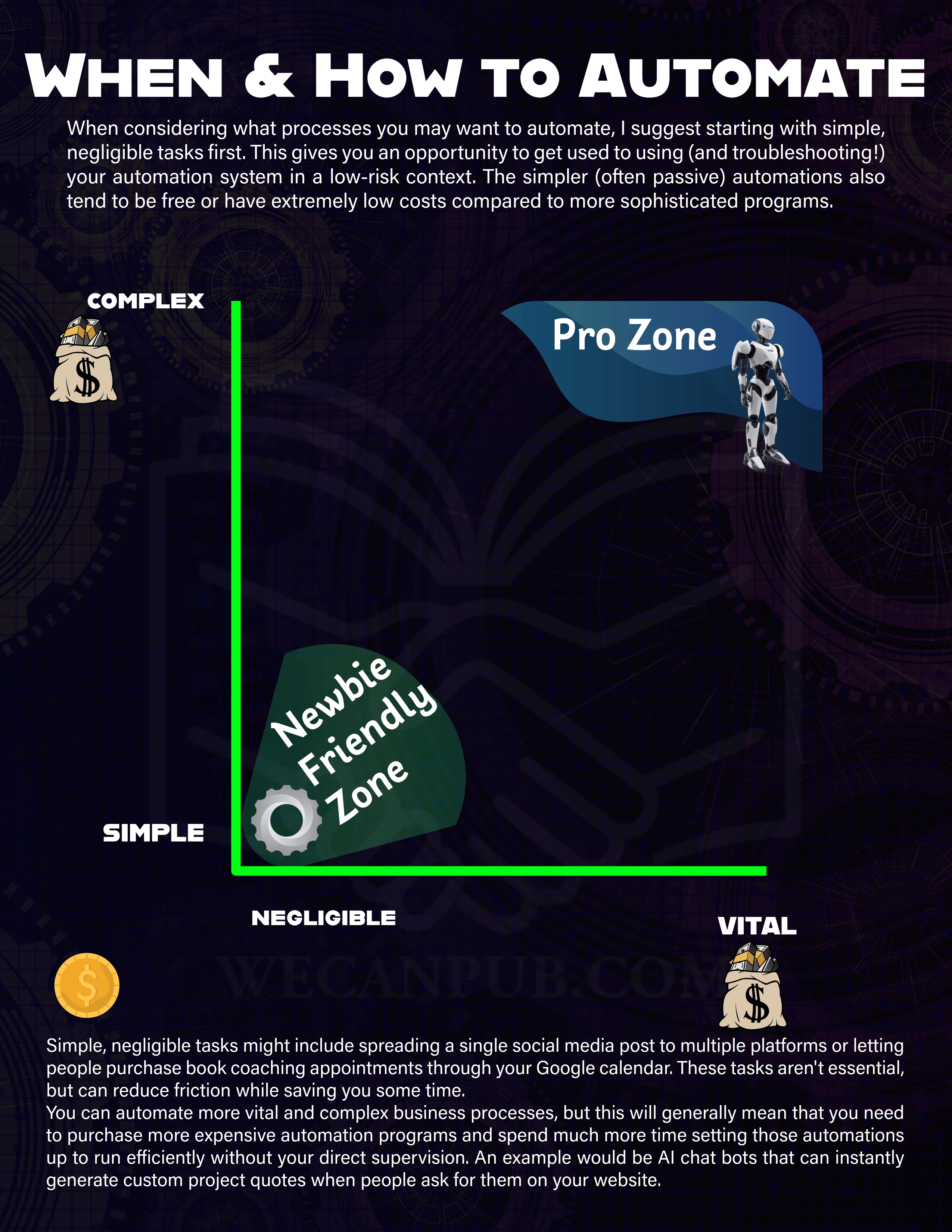
GRAPHIC: When and How to Automate
VIDEO: Zapier: First Look
VIDEO: Zapier: Multi-Step Zap with Paths
STEPS: Google Docs: Embedding Documents
Embedding full documents can help give your SEO a boost beyond simply sharing a link. You can use this method for sharing your terms and conditions, portfolio, contact information, and other kinds of materials. Head to drive.google.com to start your account and begin creating and embedding files using the steps below!
GET THE EMBED CODE A FILE
ZAPIER: BLOG POST TO SOCIAL MEDIA PAGES/PROFILES

VIDEO: Results-Driven Networking for Freelance Editors
VIDEO
SLIDES
RESOURCES
Meeting Chat File
This is an online community of editorial professionals engaging in online learning, interviews, masterminds, work sessions, and more. We’d love to have you join us there!
An ebook to help you start, strengthen, or revamp your own mastermind group. Don’t forget to use “EFA10” at checkout!
You can also connected with Linda and Brittany on social media:
Linda: Facebook | Instagram | Website
Brittany: Website
Indexing Tools and Courses
The August 2025 STET Talk featured a panel of indexers. Here are some of the courses and tools that they highlighted during the session.
American Society for Indexing: ASIndexing.org
Cindex: Free, open source indexing software: https://www.opencindex.org/
Sky Index: Paid software for indexing: https://www.sky-software.com/
Sylvia Coates’ Massive Open Online Course on Indexing: http://www.sylviacoates.com/indexing-books-as-a-career-free-mooc.html
UC Berkeley: Indexing Theory and Application: https://extension.berkeley.edu/search/publicCourseSearchDetails.do?method=load&courseId=41381
Book Development Clock
When you find yourself needing to explain to a client that they would benefit from services that they haven’t completed yet, feel free to use this graphic to help them understand what many traditional and indie books go through regarding the book development process. Explain that these multiple levels of care are what create a reading experience that audiences enjoy and can’t wait to recommend to fellow book lovers. If you have any questions, reach out to me as needed.

How Authoring Improves Editing by Katherine Pickett of POP Editorial
Connect with Katherine! It takes a few seconds and a couple of clicks to follow and show your support. Surely this hour-long session is worth that much in return! ♥
POPEditorial.net | KatherinePickettAuthor.com | Amazon Author Profile | Instagram | LinkedIn